Dental Postcard Design: How to Create Cards That Attract New Patients
Dental postcard design can help local dental practices reach potential patients. A well-designed postcard introduces your services and encourages people to book appointments. It also helps patients remember your practice when they need dental care.
However, a postcard needs more than attractive colors and dental photographs. It needs a clear message, useful information and a strong call to action. Your design should also match the patients you want to reach.
This guide explains how to create effective dental postcards for US practices. It covers design ideas, layouts, printing, mailing and marketing tips.
What Is Dental Postcard Design?
Dental postcard design is the process of creating promotional cards for dental practices. These cards share information about services, special offers and appointment options.
Dental offices often use postcards to reach people within nearby communities. They can promote new patient appointments, teeth whitening and family dentistry. Some practices also use postcards to announce new locations or services.
Unlike online advertisements, postcards reach people through their physical mailboxes. This gives local practices another way to introduce their services.
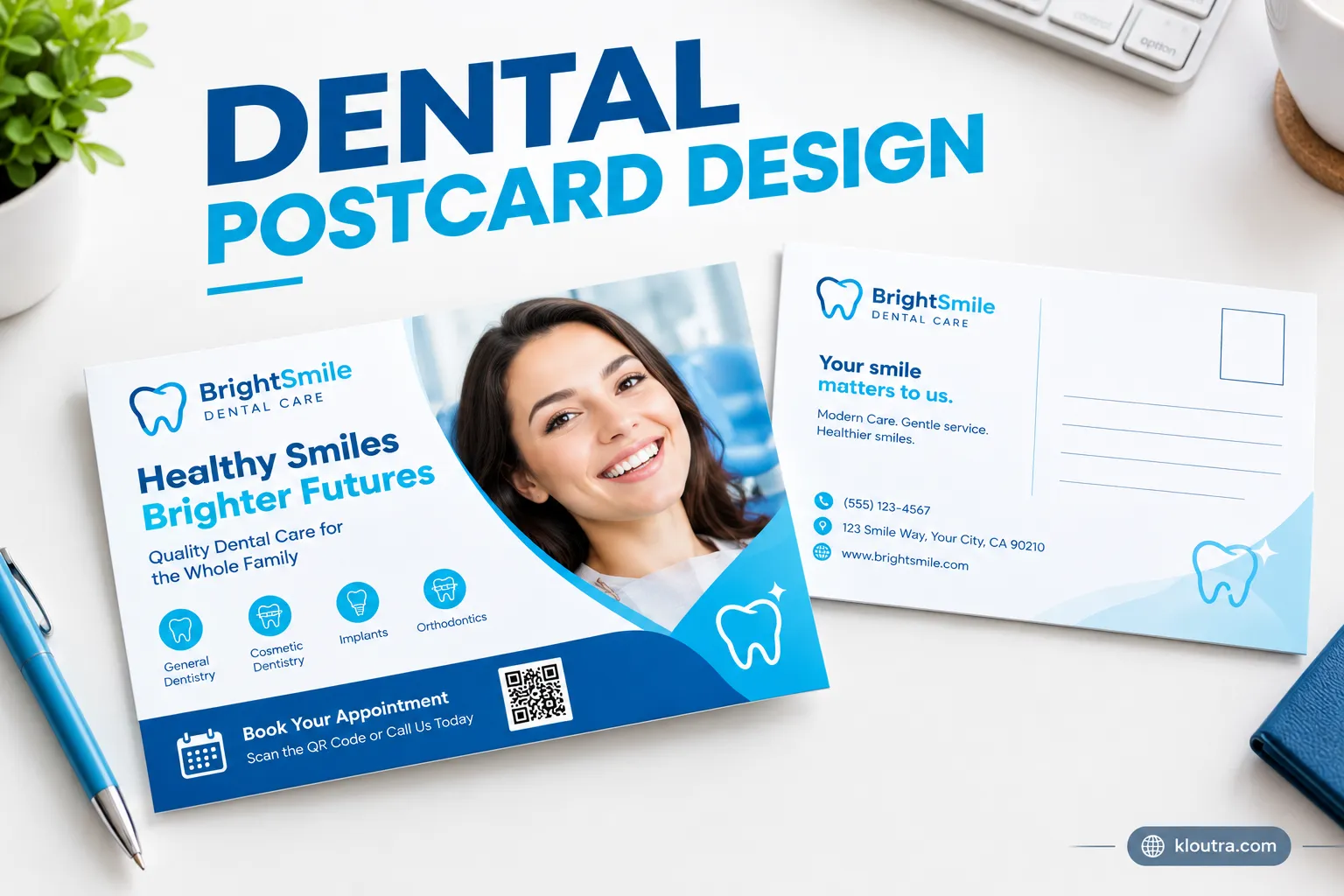
A dental postcard usually includes:
- Dental practice name and logo.
- A short headline that explains the main offer.
- A relevant photograph or visual design.
- A brief description of available services.
- Practice address, phone number and website.
- A clear appointment booking instruction.
- An offer’s terms and expiration date, when applicable.
The best designs keep these details organized and easy to read.
What Makes an Effective Dental Postcard Design?
A good dental postcard communicates its message within seconds. Readers should understand the offer without studying the entire card.
Here are the main design elements to consider.
1. Use a Clear and Attention-Grabbing Headline
Your headline should explain the main reason for sending the postcard. Avoid vague phrases that tell readers very little.
Choose simple wording that connects with a dental need.
For example:
- Looking for a New Family Dentist?
- Ready for a Brighter Smile?
- New Patients Welcome!
- Need a Dental Checkup?
- Discover Your Local Family Dental Practice.
Keep your headline short and visible. Use a readable font with enough space around it.
2. Choose Professional Dental Images
Images help readers understand your practice and services. Choose photographs that match the message of your postcard.
For a family dental practice, consider a welcoming family photograph. Cosmetic dentistry postcards may feature natural-looking smiles. A general dental postcard can show a clean treatment room.
Avoid using too many photographs on one card. One strong image often works better than several competing visuals.
Use licensed stock images or photographs you have permission to publish. Never use patient photographs without the required permissions.
3. Keep the Message Short and Easy to Read
A postcard has limited space for information. Long paragraphs can make the design difficult to understand.
Focus on one main message and a few supporting details. Explain the benefit without making unrealistic promises.
For example:
“Looking for a dentist near you? Our practice offers family dental care, routine checkups and personalized treatment.”
This message explains the service without overwhelming readers.
4. Highlight One Main Offer
A specific offer can give readers a reason to contact your practice. However, the offer must be accurate and clearly explained.
Some examples include:
- New patient consultation offers.
- Teeth whitening promotions.
- Family dental appointment packages.
- Dental cleaning promotions.
- Seasonal appointment reminders.
Include important conditions and eligibility details. Check applicable state advertising rules before publishing promotional claims.
5. Add a Clear Call to Action
A call to action tells readers what to do next. Without one, interested readers may not know how to contact you.
Use direct instructions such as:
- Call Today to Schedule an Appointment.
- Visit Our Website to Learn More.
- Scan the QR Code to Request an Appointment.
- Contact Our Office for More Information.
Make the call to action easy to notice. Include a working phone number or booking link.
Dental Postcard Design Ideas for Different Practices
Different dental practices serve different patient needs. Your postcard should reflect the services you want to promote.
Here are practical design ideas for different dental businesses.
1. New Patient Welcome Postcards
New patient postcards introduce your practice to local residents. They should make joining your practice feel simple.
Include a welcoming headline and a short introduction. Mention your general services and appointment options.
Example headline: “New to the Neighborhood? Find Your Family Dentist!”
Use a friendly photograph and clear contact details. Add a QR code that leads to your appointment page.
2. Family Dentistry Postcards
Family dentistry postcards should appeal to parents and local households. Use warm colors and welcoming family photographs.
Highlight services such as:
- Routine dental checkups.
- Children’s dental care.
- Preventive treatments.
- Family dental appointments.
- Oral hygiene guidance.
Keep the design friendly without making it look childish. Parents should quickly understand the services available.
3. Cosmetic Dentistry Postcards
Cosmetic dentistry postcards should focus on appearance-related dental services. Use clean layouts and professional smile photographs.
You can promote services such as teeth whitening, veneers and smile consultations. Explain the available service without promising identical results for everyone.
Example headline: “Explore Your Options for a Brighter Smile.”
Include a clear booking instruction for interested patients.
4. Teeth Whitening Promotion Postcards
Teeth whitening postcards can promote consultations or eligible treatment offers. Choose a bright design with a simple visual message. Include the treatment name and offer details. Explain any restrictions or consultation requirements. Avoid unrealistic claims about whitening results. Results can vary between patients and treatment methods.
5. Dental Implant Postcards
Dental implant postcards should explain the service clearly. Use professional imagery instead of graphic dental photographs. Mention implant consultations and treatment assessments. Explain that suitability depends on individual dental health.
Example headline: “Considering Dental Implants? Start With a Consultation.” Add your practice contact details and booking instructions.
6. Invisalign and Orthodontic Postcards
Orthodontic postcards should focus on treatment consultations and available options. Use simple images that show natural-looking smiles.
You can highlight clear aligners, traditional braces and orthodontic assessments. Avoid suggesting that every patient qualifies for the same treatment.
Example headline: “Explore Your Options for a Straighter Smile.”
Keep the message informative and easy to understand.
7. Dental Office Grand Opening Postcards
A grand opening postcard introduces a new dental office. It can also help an existing practice announce relocation.
Include the following information:
- Practice name and opening announcement.
- New office address.
- Opening date.
- Main dental services.
- Contact number and website.
- Directions or a location QR code.
Use a clear map or location graphic when useful. Make the new address easy to find.
How to Design the Front and Back of a Dental Postcard
A postcard has two sides, and each side serves a different purpose. Use the front to attract attention. Use the back to provide useful details.
Front-Side Design
The front should communicate your main message quickly. Avoid filling every available space with text.
Include:
- Your main headline.
- One professional dental photograph.
- Your practice logo.
- A short promotional message.
- A visible call to action.
Keep enough empty space around the main elements. This makes the design look cleaner and more professional.
Back-Side Design
The back should provide information readers need before contacting you.
Include your practice details, services and booking instructions. Add your mailing address and postage area when required.
A simple layout might look like this:
| Area | Information |
|---|---|
| Left side | Short message and service details |
| Right side | Mailing address and postage area |
| Bottom section | Website, phone number and QR code |
Check your printer’s mailing template before arranging these elements. USPS has specific requirements for mailing areas and address placement.
Best Dental Postcard Sizes for Printing and Mailing
Postcard size affects both design space and mailing costs. Choose your dimensions before creating the final artwork.
For US First-Class Mail postcard pricing, USPS sets specific size and thickness limits. Standard retail postcards must measure 3.5 × 5 inches minimum and 4.25 × 6 inches maximum.
Commercial First-Class Mail postcards have a larger maximum size. They can measure up to 6 × 9 inches, subject to thickness requirements. USPS FAQs+1
| Postcard size | Best use |
|---|---|
| 4 × 6 inches | Simple promotions and announcements |
| 5 × 7 inches | Larger promotional layouts |
| 6 × 9 inches | More space for services and offers |
These are practical design sizes, not identical postage categories. A larger card may receive letter pricing instead of postcard pricing.
Before printing, confirm the final dimensions with USPS. Also check paper thickness and address placement.
How to Choose Colors, Fonts and Images
Visual choices affect how people read and understand your postcard. Keep the design consistent with your dental practice branding.
Colors: Blue and white create a clean, familiar dental appearance. Green can support a calm and natural visual style. Use your brand colors when they remain easy to read.
Fonts: Choose simple fonts with clear letter shapes. Use larger text for headlines and smaller text for supporting details. Avoid decorative fonts for important contact information.
Images: Choose high-quality images that match your services. Avoid blurry photographs and overcrowded image layouts.
Spacing: Leave enough space between text and images. Give your headline and call to action room to stand out.
The goal is a clean design that readers can understand quickly.
How to Make Dental Postcards More Effective
Good design helps attract attention, but campaign planning matters too. These steps can make your postcard marketing easier to measure.
Use a QR Code for Easy Appointment Booking
A QR code can connect readers directly to your website. You can link it to an appointment request page or service information.
Make sure the destination works well on mobile phones. Test the code before sending postcards to print.
Add a short instruction beside it, such as “Scan to Request an Appointment.”
Target Nearby Households
Dental postcards often work best when they reach relevant local audiences. Start by identifying the areas around your dental office.
Consider factors such as:
- Distance from your practice.
- Local household coverage.
- Nearby residential communities.
- Your available appointment capacity.
- Services that match local demand.
USPS Every Door Direct Mail (EDDM) can help businesses reach selected mail routes. It allows eligible mailers to target neighborhoods without buying individual mailing lists.
Review route selection and current mailing requirements before planning your campaign.
Include Your Practice Contact Information
Readers should know how to contact your office immediately. Display your phone number and website clearly.
Include your complete practice address when location matters. Keep your opening hours accurate if you choose to display them.
Check every detail before approving the final design. Even a small phone number error can waste an entire campaign.
Create a Trackable Campaign
Tracking helps you understand whether your postcards generate responses. Use a unique QR code or campaign URL for each mailing.
You can also use a dedicated phone number. A simple offer code can help identify postcard responses.
Track these basic results:
- Number of postcards mailed.
- Number of calls received.
- Website visits from the campaign.
- Appointment requests.
- New patients acquired.
- Campaign spending.
Calculate the cost per new patient to evaluate results. Do not judge a campaign only by calls or website visits.
Common Dental Postcard Design Mistakes to Avoid
Small design mistakes can make your postcard less effective. Check these problems before sending your artwork to print.
1. Too much text: Long messages make postcards difficult to scan. Keep your message focused on one main offer.
2. Poor image quality: Blurry photographs make your practice look less professional. Use high-resolution images suitable for printing.
3. Weak headlines: Generic headlines fail to explain the offer. Tell readers what your practice provides.
4. Missing contact details: Readers need an easy way to reach your office. Check your phone number, website and address.
5. Too many offers: Multiple promotions can confuse readers. Highlight one main offer per postcard.
6. Unclear promotional terms: Missing conditions can create misunderstandings. Explain eligibility, limitations and expiration dates.
7. No clear call to action: Readers may ignore a postcard without direction. Tell them exactly what to do next.
8. Ignoring mailing requirements: Incorrect dimensions can affect postage costs. Confirm the design with your printer and USPS.
Dental Postcard Printing and Mailing Tips
A good design needs suitable printing and mailing preparation. Poor printing quality can reduce the impact of your postcard.
Consider these points before placing an order.
Choose suitable cardstock: Ask your printer about durable cardstock options. Select a finish that supports clear text and photographs.
Check print resolution: Use high-resolution images and properly prepared artwork. Ask your printer about its required file format and bleed settings.
Review a proof: Request a digital or physical proof before printing. Check spelling, colors, images and contact information.
Compare printing quotes: Compare prices, paper quality and delivery times. Check whether the quote includes mailing services.
Plan your mailing area: Select routes that make sense for your practice. Avoid sending cards too far from your service area.
Test a small campaign: Start with a manageable mailing quantity. Review responses before increasing your campaign size.
Also confirm current USPS pricing before calculating your mailing budget. Postage rates and mailing requirements can change.
Dental Advertising Rules to Consider in the USA
Dental postcards promote healthcare services, so accuracy matters. Your advertising should help patients make informed decisions.
The American Dental Association warns against false or misleading dental advertising. Claims about treatment results should have proper support. State dental boards may also impose additional advertising requirements. American Dental Association+1
Keep these points in mind:
- Do not promise guaranteed treatment results without valid support.
- Explain important offer conditions and treatment limitations.
- Use professional titles and qualifications accurately.
- Avoid misleading before-and-after photographs.
- Do not publish patient photographs without appropriate permission.
- Review your state’s dental advertising requirements.
HIPAA and patient privacy: Dental practices must protect patient information. HIPAA generally requires written authorization for marketing uses or disclosures of protected health information, subject to specific exceptions. Review the rules before using patient information in promotional campaigns. HHS.gov+1
Frequently Asked Questions
What Should Be Included on a Dental Postcard?
A dental postcard should include your practice name and contact details. Add a clear headline, relevant image and short service description. Include a booking instruction or QR code. Mention promotional conditions when applicable.
What Size Is Best for Dental Marketing Postcards?
A 4 × 6-inch postcard is a practical choice for simple promotions. A 5 × 7-inch card provides more design space. A 6 × 9-inch card suits larger promotional layouts. Check USPS requirements before choosing your final size.
Do Dental Postcards Still Work?
Dental postcards can help practices reach nearby households. Their results depend on targeting, design, offer and timing. Track calls and appointment requests to measure campaign performance. Avoid assuming that every mailed postcard will generate patients.
What Should a New Patient Dental Postcard Say?
Keep the message welcoming and straightforward. Introduce your practice and highlight available services. Explain how new patients can request appointments. Include your website, phone number and office address.
How Much Does It Cost to Design Dental Postcards?
Design costs depend on the designer and project requirements. Printing and mailing create separate expenses. Card size, paper quality and mailing quantity also affect costs. Request quotes from several providers before setting your budget.
Final Thoughts
Dental postcard design can support local dental marketing campaigns. A strong postcard combines clear messaging with professional visuals. It also makes contacting your practice simple.
Start with one clear marketing goal. Choose a suitable layout and highlight your main service. Check every detail before sending your postcards to print.
Most importantly, track campaign responses after mailing. Use those results to improve your next design. A well-planned campaign gives your dental practice a practical way to reach local communities.
Disclaimer: This article provides general dental marketing and design information. Always check current USPS requirements and applicable dental advertising laws before launching a campaign.