What Is Granular Recovery Technology? A Complete Guide (2026)
Understanding Granular Recovery Technology
Losing one file shouldn’t mean restoring your entire system. That’s the problem granular recovery technology solves. It lets you pull back small pieces of data without touching the rest.
Think of it like finding one book in a library. You don’t need to move every shelf to grab it. You just walk to the right spot and take it out. Granular recovery works the same way with backups.
The Core Concept Behind Item-Level Data Restoration
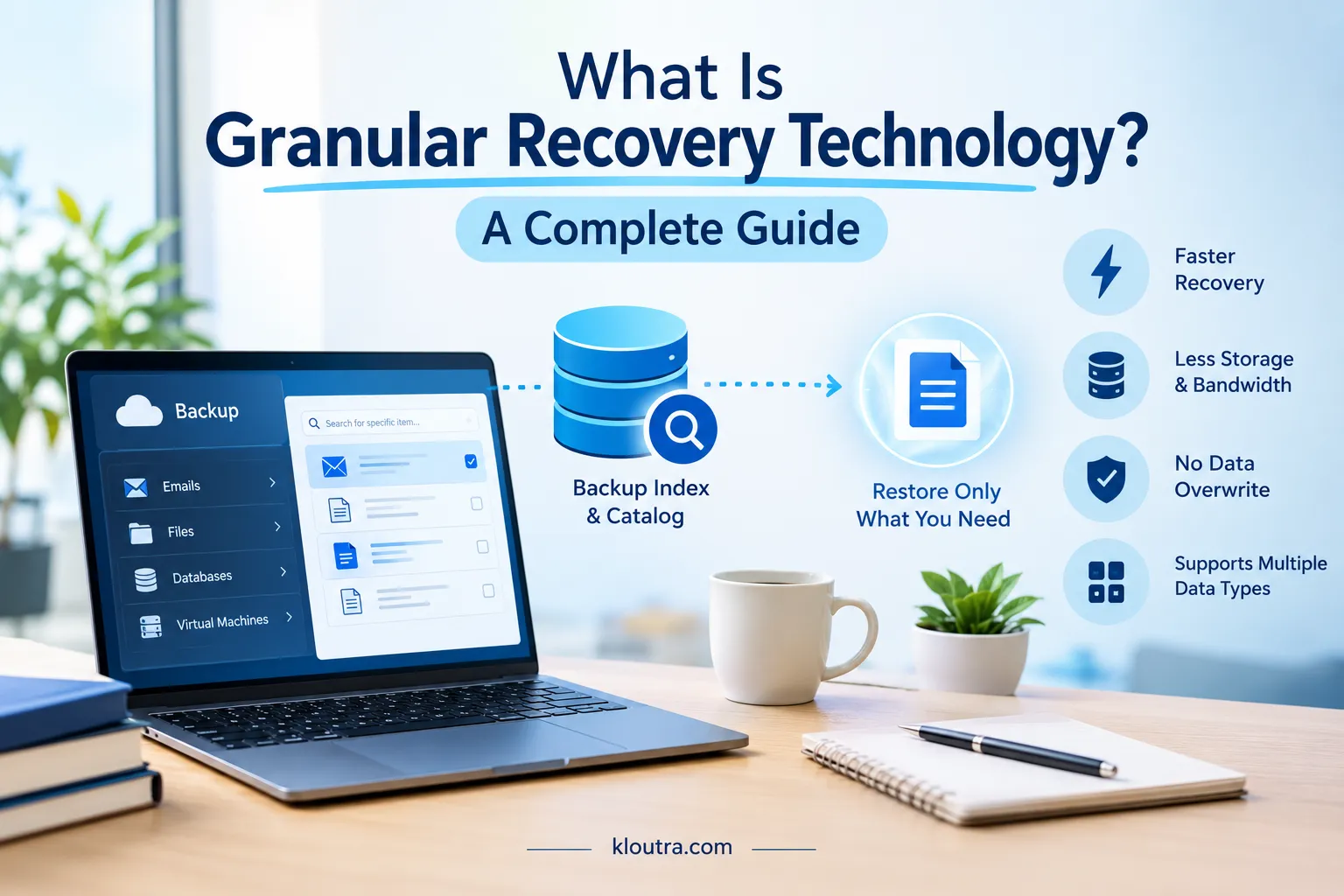
Every backup stores huge amounts of data, including emails, files, database entries, and full virtual machines. Normally, restoring any of this means bringing back the whole backup set.
Granular recovery changes that. It lets you restore a single item instead, like one email from thousands of messages, or one file from millions.
Backup Indexing and Cataloging
Before you can recover anything small, the system needs to know where it is. That’s where indexing comes in. Backup software scans every item and records details like file names, dates, and locations.
Good indexing happens automatically, usually in the background. This keeps the process fast without slowing down your systems.
The catalog also updates with each new backup. Older versions stay indexed too, so you can search across different backup points, not just the latest one.
Locating and Extracting Specific Data Items
Once everything is indexed, finding an item becomes simple. You search using details like a file name or date. The software checks its catalog and points you to the exact spot.
This search works fast because of the earlier indexing. The system doesn’t need to scan the whole backup again. After locating the item, the software extracts it.
This means pulling out just that piece, not the surrounding data. Extraction usually takes seconds or minutes, depending on item size.
Many tools also let you preview items before restoring them. This helps confirm you’re recovering the right version.
Supported Data Types (Emails, Files, Database Records, VMs)
Emails are a common example. You can recover a single email from platforms like Microsoft Exchange or Outlook. This includes attachments and folders too.
Files and folders work the same way. You can restore one document from a shared drive. There’s no need to bring back everything else stored with it.
Database records are also supported. This matters for businesses running large databases. You can recover one entry without restoring the entire database.
Virtual machines (VMs) offer another layer. Instead of restoring a whole VM, you can recover specific files inside it. This works well for platforms like VMware and Hyper-V.
Key Benefits of Granular Recovery Technology
Granular recovery isn’t just convenient. It brings real, practical benefits to businesses and IT teams. Here’s what makes it worth using.
Reduced Downtime During Data Loss Incidents
Downtime costs money. Every minute a system stays offline hurts productivity.
Instead of restoring an entire server, you fix the actual problem. Lost one file? You get it back in minutes, without waiting for a full system restore.
This matters most during everyday mistakes, like a deleted email or a corrupted file. These issues happen often, and they don’t need big fixes.
Teams recover faster because the process stays focused. Less waiting means less disruption to daily work.
For larger businesses, this adds up fast. Frequent small recoveries, done quickly, save hours over time, protecting both time and revenue.
Lower Storage and Bandwidth Consumption
Full restores use a lot of resources. They pull entire backups, even when you only need one item, wasting storage space and bandwidth.
Granular recovery avoids that waste. It extracts only the specific item you request, and nothing extra gets copied or transferred.
This matters for companies with limited storage capacity. Restoring smaller pieces means less strain on servers and networks, and lower costs.
Bandwidth savings matter too, especially for remote teams. Pulling a single file takes far less time than restoring gigabytes of data.
Over time, these savings become noticeable. Less resource use means lower operational costs and more efficient backup systems.
Precision Recovery Without Overwriting Existing Data
Full restores can be risky. They sometimes overwrite current data with older backup versions, undoing recent work by accident.
Granular recovery avoids this problem. It restores only the missing or damaged item, while everything else stays exactly as it was.
This precision protects your current data state. You don’t lose new files or updates by mistake. This is especially useful in active work environments.
Teams can recover one file without disrupting ongoing projects. This level of control builds trust in backup systems. IT teams can recover data confidently, knowing nothing else will change.
Common Use Cases Across Industries
Granular recovery isn’t just a technical feature. It solves real problems people face every day. Here are some common situations where it makes a difference.
Recovering a Single Deleted Email or Attachment
Email mistakes happen all the time. Someone deletes an important message by accident. Sometimes an attachment gets removed along with it.
Without granular recovery, fixing this means restoring the whole mailbox. That could affect thousands of other emails too. It also takes much longer to complete.
With granular recovery, you skip all that hassle. You search for the exact email using details like sender or date. The system pulls back just that message, attachment included.
This is common in offices using Microsoft Exchange or Outlook. HR teams, sales staff, and managers rely on this often. One missing email can hold important client or contract details.
Recovering it quickly avoids confusion and missed deadlines. It also keeps daily work moving without major interruptions.
Restoring Individual Files From Corrupted Systems
File corruption is a common tech headache. A document might get damaged during a save or transfer. Sometimes software crashes and ruins a file mid-edit.
Instead of restoring an entire drive, granular recovery targets that one file. In forensic work, computer examiners also focus on specific files rather than whole systems. You locate the last working version using the backup catalog. Then you pull it back without touching other files.
This is especially useful for teams sharing drives or folders. One person’s corrupted file shouldn’t affect everyone else’s work. Granular recovery keeps the fix isolated and quick.
This use case shows up often in creative teams, finance departments, and shared project folders. A single spreadsheet or report can hold critical information. Fast recovery keeps projects on schedule.
Virtual Machine-Level Recovery for IT Teams
Virtual machines often run multiple services or applications. If something breaks inside one, restoring the whole VM feels excessive.
Granular recovery allows IT teams to go deeper. They can restore specific files or folders inside a VM, without rebooting or replacing the entire environment.
This is especially useful in cloud and virtualized environments like VMware or Hyper-V. Fixing one small issue shouldn’t affect other systems running smoothly.
This approach saves time during troubleshooting and reduces the risk of new problems caused by full VM restores.
Compliance and Legal Data Retrieval Scenarios
Some industries must follow strict data rules. Legal cases, audits, and compliance checks often require specific records.
Granular recovery helps teams pull exact records needed for these cases, like a single email chain, a contract file, or database entries tied to a certain date.
This matters most in healthcare, finance, and legal industries. Regulations like HIPAA or GDPR require accurate, timely data retrieval.
Instead of searching through massive backups manually, teams find exactly what’s needed. This reduces legal risk and keeps organizations compliant with data laws.
Granular Recovery vs. Full System Recovery
Both recovery methods matter. They just solve different problems. Knowing when to use each one saves time and stress.
When to Use Each Approach
Granular recovery works best for small problems, like deleted emails, missing files, or single records. Full system recovery is different. It’s built for major failures, like hardware crashes or ransomware attacks.
If your entire system goes down, granular recovery won’t help much. That’s when full recovery becomes necessary. Using full recovery for small mistakes wastes time.
Restoring an entire server to fix one file makes no sense. A simple rule: match the method to the problem’s size. Small issue, small fix. Big disaster, full restore.
Most businesses use both together. Granular recovery handles daily hiccups, while full recovery stays ready for worst-case scenarios. A clear data backup policy helps decide which backups to keep and how often to run them.
Popular Tools Offering Granular Recovery Capabilities
Many backup platforms now offer granular recovery. Here are some well-known names in this space.
Enterprise Backup Solutions to Consider
Veeam is one of the most widely used platforms today. It offers instant VM recovery and granular restore options that cut downtime to seconds.
Commvault is another strong option for larger businesses. It supports granular recovery for applications and databases, not just files.
Veritas NetBackup is a long-standing name in enterprise backup. It integrates with databases like Microsoft SQL and Oracle, and protects VMware and Hyper-V environments.
Rubrik is a newer player but has gained strong adoption. It focuses on fast recovery and built-in ransomware protection.
Each tool works differently, but they share one goal: recovering small pieces of data fast, without touching everything else. The right choice depends on your systems, budget, and how much control your team needs.
Challenges and Limitations to Keep in Mind
Granular recovery is useful, but it’s not perfect. There are a few limits worth knowing.
Indexing takes extra storage space. Building a detailed catalog of every item adds overhead to your backups. This can slightly increase storage costs over time.
Not all systems support the same level of detail. Some older or less advanced tools only offer file-level recovery. They may not reach deeper into databases or applications.
Recovery speed depends on index quality. If indexing is incomplete or outdated, searches can take longer. Poor indexing also increases the risk of missing an item.
Granular recovery isn’t a full replacement for complete backups. It handles small, specific problems well. But it won’t help during major system failures or full data loss.
Setup can also get complex. Some tools need proper configuration to support granular recovery correctly. Without the right setup, teams may not get its full benefit.
Cost is another factor. Advanced granular recovery features often come with premium pricing. Smaller businesses may find this a limiting factor.
Understanding these limits helps set realistic expectations. Granular recovery works best as part of a bigger backup strategy, not a standalone solution.
How to Choose the Right Granular Recovery Solution
Picking the right tool matters. The wrong choice can waste time and money. Here’s what to focus on.
Key Features to Look For
Look for fast, reliable indexing. This affects how quickly you can find and restore items. Check which data types the tool supports, like files, emails, databases, or virtual machines.
Make sure the tool integrates smoothly with your current systems, like VMware or Microsoft 365. Security features matter too. Look for encryption and access controls to keep recovered data safe.
Scalability is important. As your data grows, the tool should handle larger backups without slowing down. Finally, check for a simple, clear interface. Complex tools can slow your team down during urgent recoveries.
Questions to Ask Before Investing in a Solution
Start by asking what data types you need to recover most often. This helps narrow down your options quickly. Ask how fast the tool can locate and restore items.
Speed matters most during real recovery situations. Find out if the tool integrates with your current backup system. Switching systems completely can be costly and time-consuming.
Check what kind of support the vendor offers. Reliable support matters during emergencies, not just during setup. Ask about pricing structure. Some tools charge based on data volume, others by user or device count.
Finally, ask about scalability. Make sure the tool can grow with your business, not just handle current needs. Answering these questions early helps avoid costly mistakes later.
Frequently Asked Questions
What is granular recovery technology?
It’s a way to restore single items from a backup, like one email or one file. You don’t need to restore the entire backup set.
Can granular recovery work with virtual machines?
Yes. Many tools let you restore specific files inside a VM, without rebuilding the whole machine.
Final Thoughts
Granular recovery technology solves a simple but common problem. You don’t always need to restore an entire system to fix one mistake.
It saves time, storage, and money. It also reduces stress during small, everyday data issues. That makes daily IT work much easier.
Full backups still matter for major disasters. But for everyday recovery needs, granular recovery is faster and smarter. Choosing the right tool depends on your specific needs.
Look at your data types, systems, and budget before deciding. In the end, granular recovery gives teams more control. It helps you recover exactly what you need, nothing more.
Disclaimer: This article is for informational purposes only. It does not constitute technical, legal, or professional advice. Product names, features, mentioned are based on publicly available information at the time of writing and may change. Always verify current specifications and pricing directly with the vendor before making a purchasing decision.