ETL Process Optimization: A Simple Guide to Faster Data Processing
Introduction
Slow data pipelines can quietly cost a company hours every single day. Reports get delayed. Dashboards show yesterday’s numbers instead of today’s. Teams end up waiting instead of deciding. That’s exactly the problem ETL process optimization is meant to solve.
This is why ETL process optimization matters so much right now. As businesses collect more data than ever, the old way of moving and transforming that data often can’t keep up.
The good news? You don’t need a massive budget or a team of ten engineers to fix this. In this guide, we’ll walk through simple, practical ways to make your ETL pipelines faster, more reliable, and easier to scale — including where each technique falls short, so you can weigh the trade-offs yourself instead of taking any single method on faith.
What Is ETL and Why Does Optimization Matter?
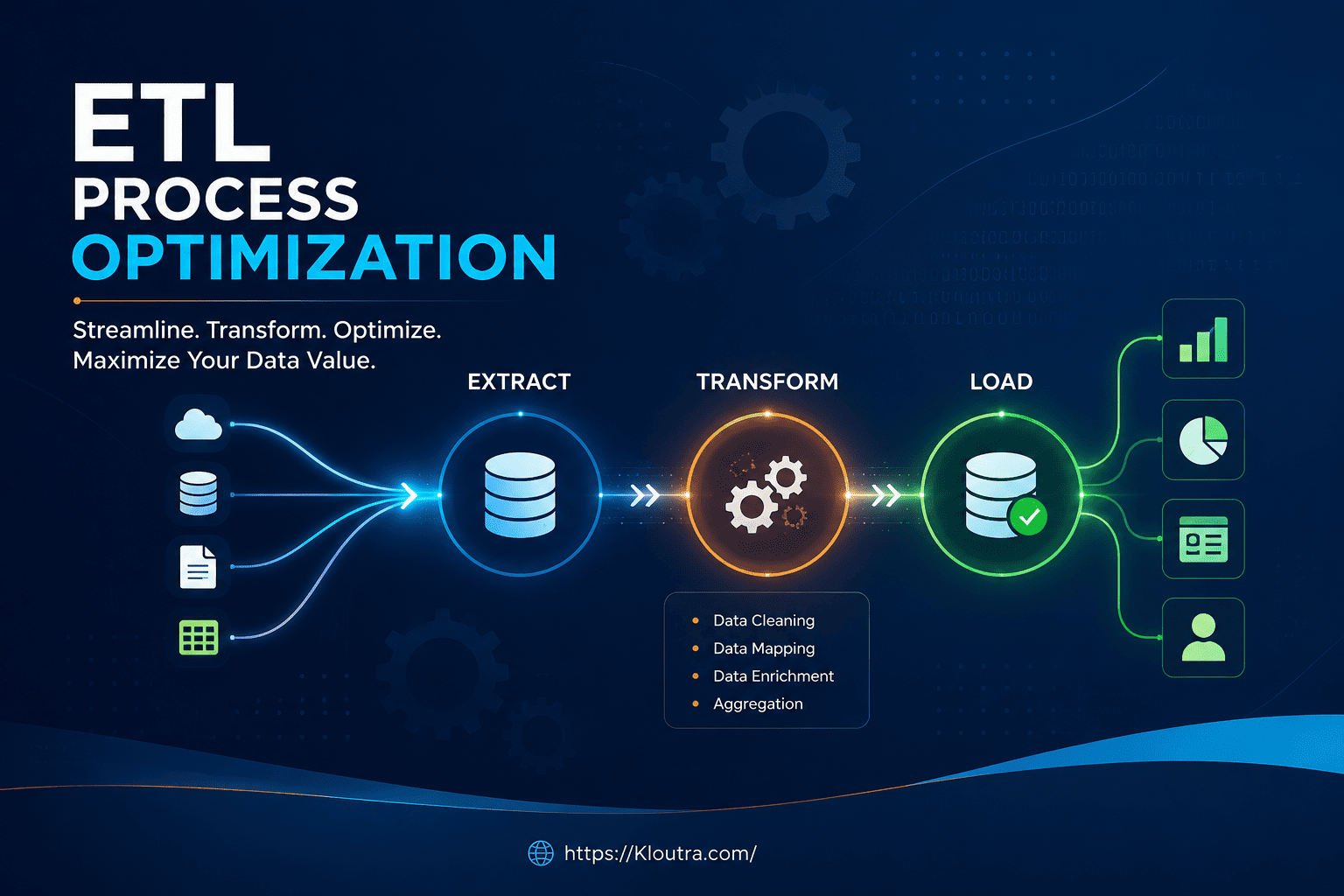
ETL stands for Extract, Transform, Load. It’s the process of pulling data from one or more sources, cleaning and reshaping it, and then loading it into a destination like a data warehouse. According to AWS’s own explainer on the topic, ETL uses a defined set of business rules to clean and organize raw data before it lands in a central repository (AWS: What Is ETL?).
Think of it like moving houses. You extract items from your old home, transform them by packing and sorting, then load them into your new place. If any step is slow or messy, the whole move takes longer.
When your ETL process is slow, everything downstream suffers. Reports lag. Machine learning models train on stale data. Business teams lose trust in the numbers they see.
That’s where ETL process optimization techniques come in. They help you move and process data faster, without sacrificing accuracy.
The Real Cost of Skipping ETL Process Optimization
A sluggish pipeline isn’t just annoying. It can lead to missed deadlines, higher cloud costs, and frustrated stakeholders.
For example, if your nightly ETL job takes 8 hours instead of 2, you’re paying for more server time. Moreover, your team has a smaller window to fix errors before the business day starts.
If you’re also responsible for the physical or virtual servers behind your pipeline, it’s worth understanding the hardware side too — Kloutra’s guide to server infrastructure basics is a useful primer before you start tuning workloads that run on that infrastructure.
Common Bottlenecks That Undermine ETL Process Optimization
Before optimizing anything, it helps to know what usually causes the slowdown. Most ETL performance improvement efforts start here.
1. Poorly Designed Extraction
Pulling too much data at once, or pulling it inefficiently, is a common problem. For instance, extracting an entire database table every time instead of just the new or changed rows wastes time and resources.
2. Inefficient Transformations
Complex transformations, especially ones done row-by-row instead of in bulk, can drag a pipeline down. Some teams also run transformations on a single machine when the workload really needs distributed processing.
3. Unoptimized Loading
Loading data one record at a time instead of in batches is a classic mistake. This single change alone can make loading painfully slow, especially for large datasets.
4. Lack of Monitoring
If you don’t track how long each step takes, you can’t know where the real problem is. Many teams optimize the wrong part of the pipeline simply because they’re guessing.
Proven ETL Process Optimization Techniques
Now let’s get into the practical part. These techniques apply whether you’re using a modern cloud tool or a more traditional setup. None of them is free of trade-offs, so each one below includes the upside and the catch.
Use Incremental Loading Instead of Full Loads
Instead of extracting all your data every time, only pull what has changed since the last run. This is often called incremental or delta loading.
For example, if you have 10 million customer records but only 5,000 changed today, there’s no reason to reprocess all 10 million. This one change can dramatically improve faster ETL processing.
Advantages: Much shorter run times, lower compute and storage costs, and less strain on source systems during extraction. Disadvantages: Requires reliable change-tracking (timestamps, change data capture, or log-based replication), and a missed or failed run can leave gaps that are harder to spot than with a full reload.
Parallelize Your Workloads
Running tasks one after another (sequentially) is often unnecessary. Many ETL steps can run at the same time instead.
However, this requires understanding which tasks depend on each other and which don’t. Tasks with no dependencies are good candidates for parallel processing.
Advantages: Cuts total pipeline runtime significantly and makes better use of available compute. Disadvantages: Adds orchestration complexity, can cause resource contention if too many jobs compete for the same database or network, and mistakes in dependency mapping can lead to race conditions or partial data.
Push Down Transformations When Possible
“Pushdown” means letting your database or warehouse do the heavy lifting instead of your ETL tool. Modern warehouses like Snowflake, BigQuery, and Redshift are built to handle large-scale transformations efficiently.
In short, do the transformation as close to the data as possible. This reduces data movement, which is often the slowest part of any pipeline.
Advantages: Less data shipped over the network, faster transformations, and lower load on your ETL/orchestration layer. Disadvantages: Ties your transformation logic more tightly to a specific warehouse’s SQL dialect, which can make switching platforms later more difficult, and it shifts compute costs onto your warehouse bill.
Optimize Batch Sizes
Loading data in batches, rather than one record at a time, is a simple but powerful fix. That said, batches that are too large can also cause memory issues.
A good starting point is testing a few different batch sizes and measuring the results. There’s no single “correct” size — it depends on your data and infrastructure.
Advantages: Big jump in load throughput compared to row-by-row loading, with relatively little engineering effort. Disadvantages: Oversized batches can spike memory usage or cause long-running transactions that are harder to roll back if something fails mid-batch.
Index and Partition Your Data
Indexing helps your database find data faster, similar to how an index in a textbook helps you find a topic without reading every page. Partitioning breaks large tables into smaller, more manageable chunks, often by date.
Together, these two techniques can significantly improve data pipeline performance, especially for large historical datasets.
Advantages: Much faster reads and queries, and partitioning makes it easy to drop or archive old data cheaply. Disadvantages: Extra indexes slow down writes and consume more storage, and a poor partitioning key can leave you with uneven, “hot” partitions that don’t actually help performance.
How ETL Process Optimization Improves Scalability
ETL scalability means your pipeline can handle growing data volumes without falling apart. A pipeline that works fine with 1 million rows might completely break at 100 million rows if it wasn’t built to scale.
Design for Growth From the Start
It’s tempting to build for today’s data volume only. However, thinking ahead — even a little — saves major rework later.
Use Cloud-Based, Elastic Infrastructure
Cloud platforms let you scale computing power up or down based on demand. This means you’re not stuck paying for peak capacity all the time, but you still have it available when needed.
Advantages: Pay-as-you-go scaling and less time spent capacity-planning by hand. Disadvantages: Costs can grow unpredictably if usage isn’t monitored, and elastic infrastructure still needs someone watching resource usage and billing.
Decouple Extraction, Transformation, and Loading
When these three steps are tightly linked, a slowdown in one affects all the others. Separating them, often using message queues or staging areas, gives each step room to scale independently.
The Role of Automation in ETL Process Optimization
Manual pipeline management doesn’t scale well. As data sources grow, so does the risk of human error.
Why Automate Your ETL Pipeline
ETL automation reduces the need for manual scripts and constant babysitting. Scheduled jobs, automated error handling, and self-healing pipelines all fall under this category.
For example, instead of someone manually re-running a failed job at 2 a.m., an automated system can detect the failure, retry it, and alert the team only if it fails again.
If you’re weighing which tools should sit at the center of that automation, Kloutra’s breakdown of choosing a workflow automation stack covers similar trade-offs between no-code connectors and more code-first approaches, which carry over well to ETL tooling decisions.
Advantages: Fewer late-night fire drills, more consistent runs, and faster recovery from routine failures. Disadvantages: Automated retries can mask a recurring root cause if no one reviews the logs, and over-automating without good alerting can let a real failure slip by unnoticed.
Tools That Support Automation
Many modern ETL and data pipeline tools include built-in scheduling, monitoring, and alerting features. Popular options include Apache Airflow, dbt, Fivetran, and Talend, though the right choice depends on your specific needs and budget.
Apache Airflow, for instance, is an open-source platform for authoring, scheduling, and monitoring workflows as code (Apache Airflow documentation), while dbt focuses specifically on bringing software-engineering practices like testing and version control to the transformation step (dbt Labs: What is dbt?).
Since tools and pricing change often, it’s worth checking each vendor’s current documentation before deciding.
Monitoring: How to Measure ETL Process Optimization Results
You can’t improve what you don’t measure. Tracking key metrics is essential for any serious ETL performance improvement effort.
Key Metrics to Track
- Job duration: How long each pipeline run takes
- Data volume processed: How much data moves through per run
- Error and failure rates: How often jobs fail or need retries
- Resource usage: CPU, memory, and storage consumption during runs
Set Up Alerts, Not Just Dashboards
A dashboard only helps if someone is watching it. Alerts that notify your team the moment something goes wrong are far more useful for catching issues early.
Simple ETL Optimization Checklist
Here’s a quick summary you can come back to:
- Switch to incremental loading where possible
- Run independent tasks in parallel
- Push transformations to your data warehouse when it makes sense
- Test and adjust your batch sizes
- Index and partition large tables
- Automate scheduling, retries, and alerts
- Monitor job duration, errors, and resource use regularly
FAQ
What is ETL process optimization?
ETL process optimization means improving how data is extracted, transformed, and loaded so it runs faster and uses fewer resources. It involves techniques like incremental loading, parallel processing, and better use of automation.
How long should an ETL process take?
There’s no universal answer, since it depends on data volume, infrastructure, and complexity. The real goal is consistency and reliability — your pipeline should finish within the time window your business needs, without failures.
What is the difference between ETL and ELT?
ETL transforms data before loading it into the destination, while ELT loads raw data first and transforms it afterward using the destination’s processing power. Many modern cloud warehouses favor ELT because they can handle large-scale transformations efficiently.
Can small businesses benefit from ETL optimization?
Yes, definitely. Even small data volumes benefit from faster processing, lower costs, and fewer errors, and many optimization techniques, like incremental loading, are simple to apply regardless of company size.
What tools help with ETL automation?
Popular tools include Apache Airflow, dbt, Fivetran, and Talend, each with different strengths. Since features and pricing change over time, it’s a good idea to compare current options based on your specific needs.
Conclusion
ETL process optimization doesn’t have to be complicated. By focusing on incremental loading, smart parallelization, automation, and consistent monitoring, you can build a pipeline that keeps up with your business instead of holding it back. Every technique here comes with a real trade-off, so the best move is to pick the one or two that fix your worst current bottleneck rather than trying to apply all of them at once.
Start small. Pick one bottleneck from your current pipeline and fix it this week. Over time, these small improvements add up to a faster, more reliable, and more scalable data process.
If your team is still manually babysitting data jobs, now is a good time to explore automation tools and see what fits your workflow best.
Disclaimer: This guide is for general informational purposes only, not professional or vendor-specific advice. Verify current features, pricing, and best practices with official documentation before making decision