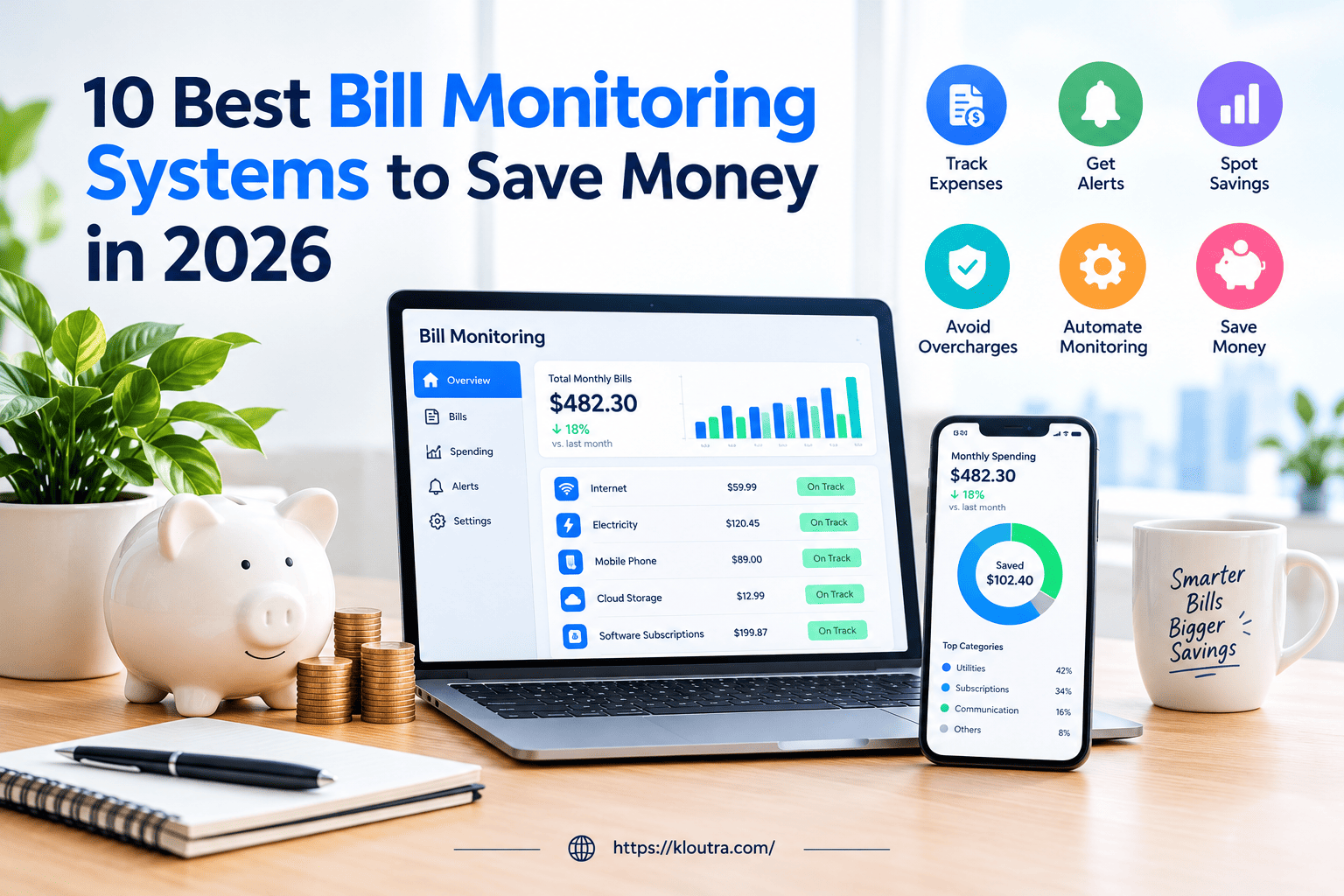
10 Best Bill Monitoring Systems to Save Money in 2026
Managing monthly bills can become difficult when you have multiple subscriptions, utility payments, and recurring expenses. Small billing errors, duplicate charges, and unexpected price increases can easily go unnoticed.
A bill monitoring system helps you track these payments and identify unusual charges before they affect your budget. Many modern tools use automation and artificial intelligence to simplify bill tracking and send timely alerts. Whether you manage personal expenses or business invoices, the right bill monitoring system can save time and reduce financial stress.
In this guide, we explore the 10 best bill monitoring systems in 2026, their key features, benefits, and how to choose the right bill monitoring system for your needs.
What Is a Bill Monitoring System?
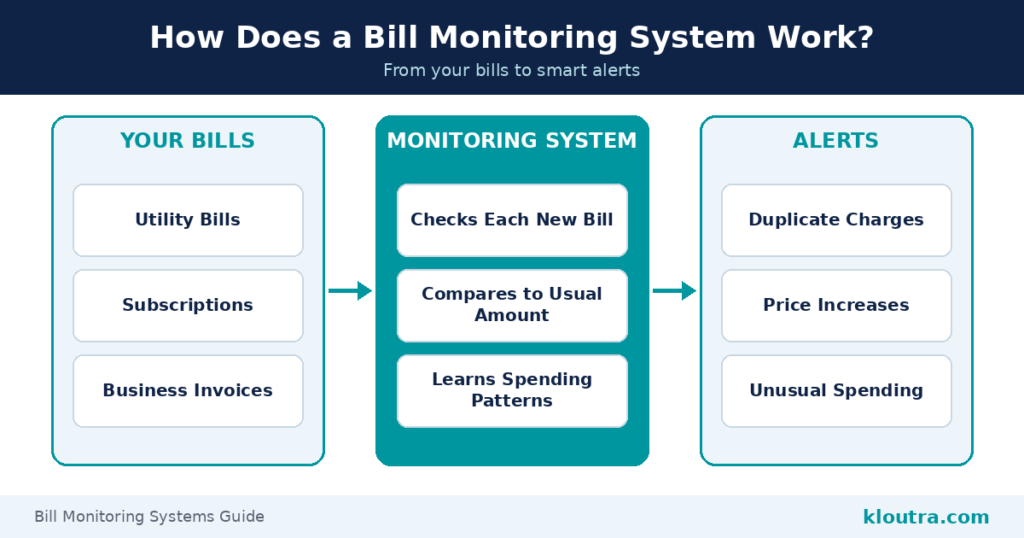
A bill monitoring system is a tool that tracks your recurring bills. Think utility bills, subscriptions, and business expenses.
It watches these bills for you. You do not need to search through emails or paper bills. The system checks each bill when it arrives. It compares the amount to what you usually pay.
If something seems wrong, it sends you an alert. Maybe your electricity bill jumped for no reason. Maybe you got charged twice for the same subscription.
You get notified right away. You don’t have to catch the mistake yourself.
Many modern systems now use AI to do this. They learn your normal spending patterns over time. This makes the alerts smarter and more accurate.
Some tools focus on personal bills. Others are built for businesses with dozens of vendors and accounts. In both cases, the goal is the same. Catch billing errors early. Save money without extra effort.
Why Bill Monitoring Matters More Than Ever in 2026
Bills are getting harder to track. Most people juggle multiple subscriptions, utilities, and service payments every month.
Manual tracking just doesn’t work anymore. There are many bills and not enough time.
That’s why bill monitoring tools are growing fast right now.
The Rise of AI-Driven Error Detection
AI is changing how billing errors get caught. Instead of manual checks, smart systems scan bills automatically. This market is growing fast. It was worth $2.3 billion in 2025.
It’s expected to hit $2.91 billion in 2026. That’s a growth rate of over 26% in one year. Why the fast growth? Businesses want fewer billing mistakes and less manual work.
AI tools can find patterns that people often miss. They flag issues within seconds, not days.
Rising Duplicate Charges & Billing Complexity
Billing has become more complex than before. Most people now pay for multiple apps, services, and subscriptions. This makes duplicate charges more common. You might get billed twice without noticing.
Free trials that turn into paid plans add to the confusion. So do forgotten subscriptions still charging your card. Businesses face this on a bigger scale. They deal with dozens of vendors and recurring invoices.
More bills mean more room for error. This is exactly where monitoring tools step in. They catch overlapping charges before they add up. They also flag unusual spending the moment it happens.
Key Features to Look For
Not all bill monitoring tools work the same way. Here are the main things to look for when choosing one.
Real-Time Alerts
Good tools notify you the moment something looks wrong. You should not need to log in and check it yourself. Look for instant alerts sent to your phone or email. This helps you catch problems the same day they happen.
Delayed alerts defeat the purpose. By then, the charge may already be processed.
AI-Powered Spending Analysis
The best tools don’t just track bills. They learn your normal spending habits over time. This means they can spot unusual charges automatically. No need to set every rule yourself.
AI agents are now handling this kind of work in the background. They flag odd patterns before you even notice them.
This saves time and catches mistakes humans often miss.
Multi-Account & Cloud Integration
You probably have bills spread across different accounts. Bank accounts, credit cards, and multiple service providers. A good system connects all of them in one place. This gives you a full picture, not scattered pieces.
Cloud-based tools make this easier. More businesses are moving their data to the cloud right now. This shift is a big reason automated bill tracking is in higher demand.
Security & Data Encryption
Bill monitoring tools handle sensitive financial data. Security should never be an afterthought. Look for tools that use encryption to protect your information. This helps keep your data safe from people who should not access it.
Check if the provider follows standard security practices. Two-factor login is a good sign. Your financial data needs the same protection as your bank account.
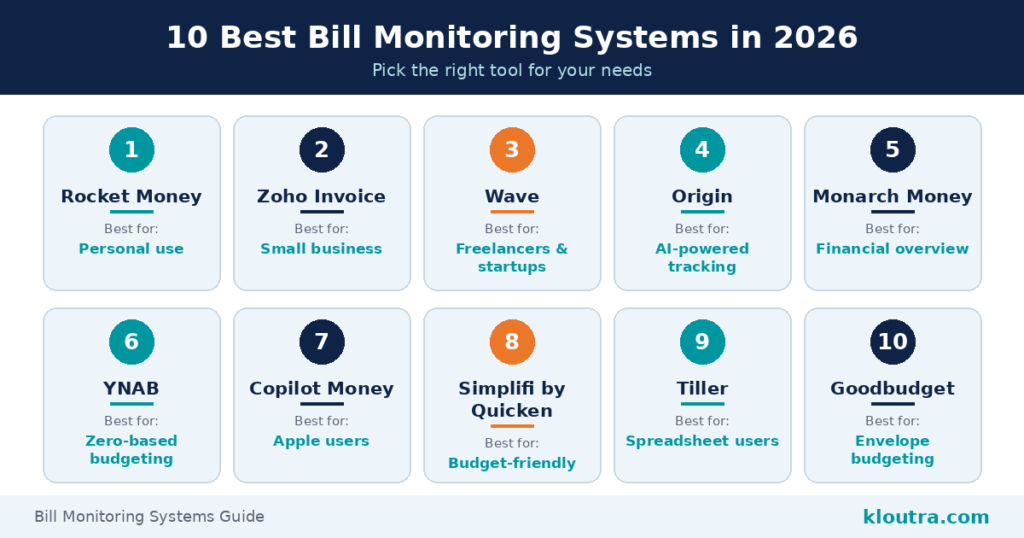
10 Best Bill Monitoring Systems in 2026
There are many tools out there. Here are four solid picks based on what they do best.
| Tool Name | Best For | Main Purpose | Free Option |
|---|---|---|---|
| Rocket Money | Personal use | Subscription and recurring bill tracking | Limited free features |
| Zoho Invoice | Small businesses | Invoice and expense management | Yes |
| Wave | Freelancers and startups | Invoicing and accounting | Yes |
| Origin | AI-powered tracking | AI-based financial management | Check current plan |
| Monarch Money | Financial overview | Budget, spending, and net worth tracking | No permanent free plan |
| YNAB | Zero-based budgeting | Budget planning and expense control | Trial available |
| Copilot Money | Apple users | Spending and subscription tracking | Trial available |
| Simplifi by Quicken | Budget-conscious users | Budgeting and bill tracking | Trial available |
| Tiller | Spreadsheet users | Financial tracking in spreadsheets | Trial available |
| Goodbudget | Envelope budgeting | Category-based budget planning | Yes |
Note: Free features, trials, and availability can change. Verify each provider’s current offering before publishing.
Tool 1 — Best for Personal Use: Rocket Money
Rocket Money tracks your subscriptions and recurring charges automatically. It alerts you when a price goes up. It also helps you cancel services you no longer use. This makes it easy to spot wasted spending fast.
Great choice if you just want to clean up personal bills without much effort.
Tool 2 — Best for Small Business: Zoho Invoice
Zoho Invoice helps small businesses track invoices and expenses in one place. It supports multiple currencies and payment gateways. The free plan lets you send up to 1,000 invoices each year.
That covers most freelancers and small teams. It’s a solid pick if you need billing and expense tracking together.
Tool 3 — Best Free Option: Wave
Wave offers free invoicing and accounting with no time limit. There’s no hidden fee or trial period. You get unlimited invoices and full accounting tools.
This makes it a strong choice for startups on a tight budget. It’s simple to set up and doesn’t require a credit card to start.
Tool 4 — Best AI-Powered Tracking: Origin
Origin uses AI to pull your bills and subscriptions into one dashboard automatically. You do not need to enter anything yourself. Its AI Advisor can answer questions about upcoming expenses.
It also shows how a bill affects your overall budget. This goes beyond simple reminders. It helps you understand your money, not just track it.
Tool 5 — Best Full Financial Dashboard: Monarch Money
Monarch Money brings all your accounts into one dashboard. Bills, spending, and net worth all show up in one place.
There’s no free plan, but the feature set is strong. Good pick if you want a complete money overview, not just bill alerts.
Tool 6 — Best for Zero-Based Budgeting: YNAB
YNAB stands for You Need A Budget. It helps you plan how to spend every dollar before you use it.
This helps you plan ahead instead of reacting later. Over time, it builds better spending habits. That’s a strong track record.
Tool 7 — Best for iPhone Users: Copilot Money
Copilot Money is built specifically for iPhone and syncs smoothly with Apple devices. It tracks bills, spending, and subscriptions automatically.
A great fit if you’re deep in the Apple ecosystem already.
Tool 8 — Best Budget-Friendly Option: Simplifi by Quicken
Simplify offers solid bill tracking at a lower price. It syncs your bank accounts and flags upcoming bills automatically.
You still get real tracking without paying premium prices. Good option if you want core features without a big monthly cost.
Tool 9 — Best for Spreadsheet Lovers: Tiller
Tiller connects your bills and transactions directly into Google Sheets or Excel. You get full control over how your data looks.
This works well if you already like building your own budget templates. It automates the data entry part only.
Ideal for people who want spreadsheet power without manual updates.
Tool 10 — Best Free Envelope Budgeting: Goodbudget
Goodbudget uses the envelope budgeting method, but digitally. You assign money to categories, including bills, before you spend it.
It has a free version that covers most basic needs. This makes it a solid starting point for beginners.
Simple, visual, and easy to stick with long term.
Personal vs Business Bill Monitoring — What’s the Difference?
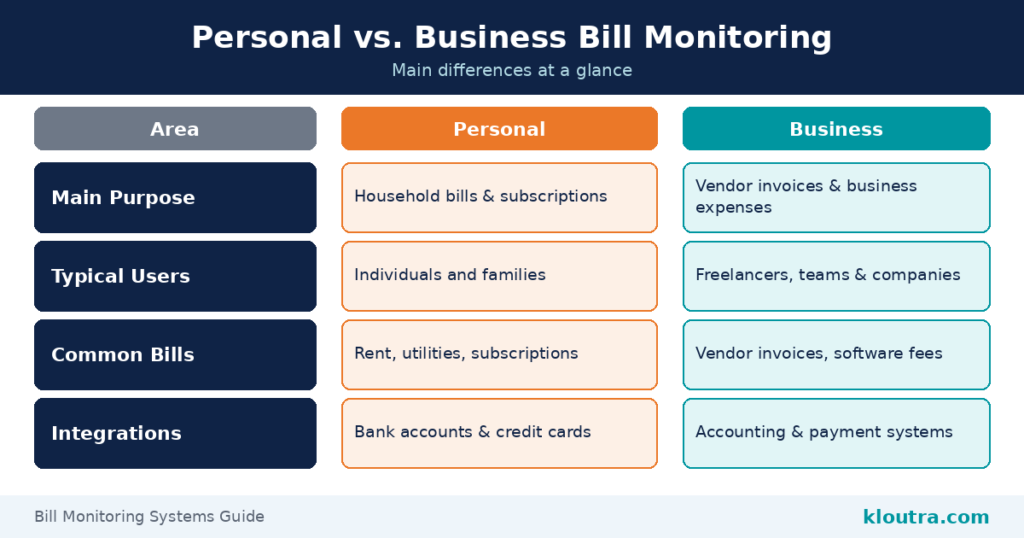
| Feature | Personal Bill Monitoring | Business Bill Monitoring |
|---|---|---|
| Main Purpose | Household bills and subscriptions track karna | Vendor invoices and business expenses track karna |
| Typical Users | Individuals and families | Freelancers, teams, and companies |
| Common Bills | Rent, utilities, and subscriptions | Vendor invoices, software fees, and service payments |
| Account Access | Usually one user | Multiple team members may need access |
| Integrations | Bank accounts and credit cards | Accounting and payment systems |
| Key Benefit | Personal spending par control | Expense management and billing accuracy |
Personal and business bill monitoring look similar. But they solve different problems. Personal tools focus on simple things. Rent, subscriptions, utilities, and credit card bills.
You just want to know what’s due and when. Alerts and reminders are usually enough. Business monitoring works on a bigger scale. Companies deal with dozens of vendors and recurring invoices.
They also need multiple people to see the same data. A finance team, not just one person. Compliance matters more for businesses too. Every expense often needs a paper trail.
Personal tools rarely need team access. One person usually manages the whole account. Business tools often connect with accounting software. Think QuickBooks, Xero, or similar platforms.
This keeps bills, payments, and taxes lined up properly. Personal apps don’t need this level of integration. The core idea stays the same either way. Catch errors early and stay in control. But the scale, tools, and stakes are very different.
How to Choose the Right Bill Monitoring System
Picking the right tool depends on your needs. Here’s what to check before you decide.
Think about how many accounts you have. If you only track a few bills, a simple app works fine.
If you manage many vendors or accounts, pick a tool built for that scale.
Check what integrations you need. Business owners should look for accounting software support, like QuickBooks or Xero.
Personal users don’t need this. A bank sync is usually enough.
Look at automation level. Some tools just send reminders. Others use AI to catch errors on their own.
If you want less manual work, pick an AI-powered option.
Consider team size. Solo users don’t need shared access. Businesses with a finance team do.
Read real user reviews. Check the app store rating and how many people left feedback.
A tool with thousands of reviews and a high rating is usually reliable.
Test it before committing. Most tools offer a free trial or free tier.
Try it for a few weeks. See if it actually fits how you manage money.
| Your Requirement | Suitable Tool | Why It May Fit |
|---|---|---|
| Track personal subscriptions | Rocket Money | Recurring charges and subscription management |
| Manage small-business invoices | Zoho Invoice | Invoice creation and management |
| Free invoicing and accounting | Wave | Offers free core invoicing and accounting features |
| View your overall finances | Monarch Money | Combines spending, budgets, and net worth |
| Plan every dollar | YNAB | Focuses on zero-based budgeting |
| Track finances in spreadsheets | Tiller | Connects financial data with spreadsheets |
| Use envelope budgeting | Goodbudget | Organizes money into spending categories |
Note: These are suggested starting points, not a guarantee that every tool provides dedicated bill-error detection.
Frequently Asked Questions
Is bill monitoring software safe to use?
Yes, most trusted apps use bank-level encryption. This keeps your financial data protected. Look for two-factor login as an extra safety layer.
It adds a second check before anyone can access your account. Stick to well-known apps with strong reviews. Avoid unknown tools that ask for unnecessary permissions.
Can it work with multiple bank accounts?
Yes, most modern tools support multiple accounts. This includes banks, credit cards, and even loans.
Apps like Monarch Money and Copilot Money sync several accounts at once. This gives you one clear view of all your bills.
Business tools go further. They often connect to multiple vendors and accounting platforms too.
Are there free bill monitoring tools?
Yes, several good free options exist. Wave offers free invoicing and accounting with no time limit. Good budget also has a free version for basic budgeting. It works well for personal use.
Free plans usually have limits. But they’re a solid starting point before upgrading to a paid tool.
Final Verdict
Bill monitoring systems save you time and money. They catch errors before they pile up. Personal users should start simple. Try Rocket Money or Wave if you want something easy and free.
Small businesses need more structure. Zoho Invoice or Monarch Money offer that extra layer of control. Want AI to do the heavy lifting? Origin is worth trying for smarter, automatic tracking.
There’s no single “best” tool for everyone. The right one depends on your bills, your budget, and how hands-on you want to be. Pick one, try it for a few weeks, and see how it fits. Small changes like this add up fast.
Disclaimer: This article is for informational purposes only. Pricing, features, and ratings mentioned are accurate as of the publish date but may change over time. We recommend checking each provider’s official website for the latest details before making a decision. This is not financial advice — always evaluate your own needs before choosing a bill monitoring tool.